
The vertical video is a recording that is taller than it is wide, typically prepared in a 9:16 aspect ratio to fill the mobile screen. This format caters to brands, creators, educators, and professionals who want to adapt a recording or produce content for Reels, TikTok, and YouTube Shorts. With planned framing, editing, and subtitles, a single piece of material can yield several clips without losing context.
The main points to plan a vertical video
- Use 9:16 as a starting point for full-screen content; 1080 × 1920 pixels is a common resolution in this ratio.
- Choose the format based on the purpose: a video for mobile requires different composition than a presentation or long interview.
- When converting horizontal footage, reframe important people and objects instead of applying an automatic cut without review.
- Leave space for subtitles and social media interface elements, which may cover parts of the image.
- Analyze retention and relevant actions, not just the number of views.
What defines the vertical ratio 9:16?
A 9:16 ratio means that the image has nine units of width for every sixteen of height. In practice, 1080 × 1920 pixels and 720 × 1280 pixels are examples of dimensions with this same ratio. The ratio describes the frame format, while the resolution indicates how many pixels make up the image.
The vertical format is suitable for content viewed on mobile devices in portrait mode, such as quick demonstrations, tips, short interviews, and excerpts from classes or podcasts. It does not automatically replace horizontal video: each orientation serves a way of viewing and a publishing intention.
There is also the 4:5 portrait, which is shorter than 9:16, and the square 1:1. These ratios can work in feed posts, but do not fill the screen in the same way as a full-screen vertical clip. The choice should consider the channel, the positioning of the content, and where the audience tends to watch.
What ratio to use for each type of publication?
For short full-screen videos, 9:16 is often the most practical starting point. For other spaces, such as feed, company page, or presentation, a wider or less tall ratio may better showcase the material. The table helps choose an initial format; it does not replace checking the specifications of each publication.
| Format | Common Ratio | Possible Use |
|---|---|---|
| Full-screen vertical | 9:16 | Short videos, demonstrations, and conversation excerpts for mobile |
| Portrait for feed | 4:5 | Vertical posts that need to share space with other feed content |
| Square | 1:1 | Pieces that need to maintain balanced composition across different views |
| Horizontal | 16:9 | Classes, interviews, presentations, and videos for wide screens |
A team recording an interview can keep the complete 16:9 version and export excerpts in 9:16 for sharing. Meanwhile, a demonstration made for mobile can be recorded directly in vertical. In both cases, it’s worth testing the file in the final destination since display areas and on-screen controls vary between platforms.
How to record vertically without compromising the framing?
A good vertical recording starts with the device in the correct orientation and the subject positioned with the narrow screen in mind. Before recording, check the space above the head, the distance from the face to the edges, and the area that will remain free for subtitles. A central framing also makes for easier adjustments later.
- Position the lens approximately at eye level for conversations and presentations.
- Leave a margin around the face and hands, especially when the person gestures.
- Use soft front or side lighting to separate the subject from the background.
- Ensure that the speech is clear and that nearby noises do not compete with the voice.
- Make a short test recording to check focus, exposure, and stability.
In interviews with two people, avoid placing the participants too far apart. The narrow width may leave one of them out of the frame. An alternative is to record individual shots or to plan a composition that allows for focus changes during editing.

How to adapt horizontal footage to vertical format?
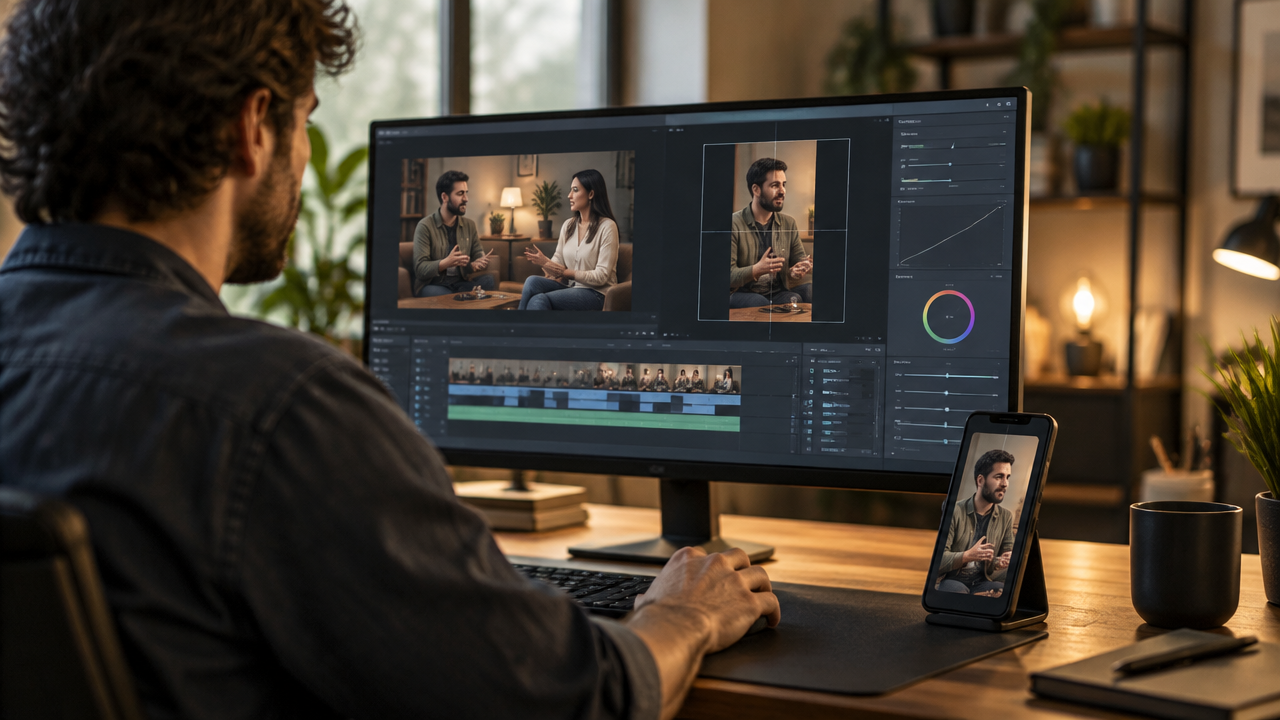
Adapting a horizontal video requires deciding what should remain visible in a narrower frame. A simple cut may work when there is a single centered person, but it may eliminate important gestures, products, or participants. Therefore, the first step is to identify the action and information that support each clip.
- Create a working copy: keep the original recording intact for other formats and new cuts.
- Define the vertical frame: adjust the screen to 9:16 and choose the appropriate final resolution.
- Reframe the subject: keep the face, the object being demonstrated, or the main action within the visible area.
- Track changes: if the person moves, use framing adjustments throughout the clip.
- Recover the context: when the cut is not enough, add a supporting image, blurred background, or composition with more than one shot.
- Review from start to finish: confirm that faces, products, subtitles, and essential elements remain visible.
For a conversation with two people, the editor can alternate between who is speaking or show the participants in separate frames. In a demonstration, the focus may shift from the face to the object. Automatic editing helps speed up reframing, but human review remains important when the image contains details that cannot be cut.
How to keep subtitles and important elements visible?
Subtitles and text should remain legible without covering faces, products, or important actions. As each network presents buttons and information about the video, there is no single safe area that works for all publications. A generous margin on the sides and at the bottom reduces the risk of overlap.
Use short phrases per block and sufficient contrast between the letters and the background. If the setting has many details, apply a discreet band or shadow behind the text. It’s also helpful to review punctuation, proper names, and the timing of the subtitles, especially in recordings with multiple participants or technical terms.
A consistent visual identity can include recurring colors, fonts, and positions for the subtitles. The pattern needs to serve readability before serving decoration. In educational videos, for example, a keyword may receive emphasis while the rest of the speech appears in plain text.
How to turn a long video into several short clips?
A long recording can yield several vertical videos when each excerpt presents a complete idea. Instead of cutting at every fixed interval, identify helpful answers, demonstrations, stories, or explanations that make sense without relying on many previous minutes.
In a podcast episode, a segment may present a question and its answer; in a class, it may explain a concept; in a guidance session, it may summarize a recommendation without exposing private information. Each clip should have enough context for someone who has not seen the entire recording to understand the topic.
VDClip helps locate highlights in long recordings and convert them into vertical clips with subtitles. The platform also offers reframing of participants, removal of silences, clip potential scoring, branding features, and publishing and scheduling options. These resources speed up repetitive steps, while the final selection of the excerpt remains dependent on the editorial goal.
- Choose a goal for each cut, such as explaining, demonstrating, or answering.
- Open the video with the question or information that gives context to the excerpt.
- Remove pauses that do not add value, without making the speech sound artificial or difficult to follow.
- Finish with a clear conclusion or a next step that aligns with the intended publication.
How to measure if a vertical video is working?
The outcome depends on the content’s objective, so isolated views do not explain overall performance. For reach, observe how many people start watching and if they continue with the video. For an educational publication, saves and shares may indicate usefulness; for a campaign, clicks or subsequent actions may be more relevant.
Compare clips of similar duration and theme, published under similar conditions. If a video loses viewers early on, test a more direct opening. If the audience watches but does not interact, perhaps the content does not make clear what action makes sense afterward. Changes in framing, subtitles, or pacing can also alter the response.
Metric definitions may vary between networks and change over time. On YouTube, the view count for Shorts began including starts and replays without a minimum display time on March 31, 2025; the platform also maintained a metric for intentional views in Analytics. The official guide to creating and measuring Shorts explains this distinction, which is important when comparing different periods.
What mistakes most harm vertical publishing?
- Cutting without checking: the face may be centered at first and move out of frame when the person moves.
- Using small text: extensive subtitles and reduced fonts become difficult to read on compact screens.
- Ignoring the interface: buttons and information from the platform may cover subtitles or video details.
- Publishing the same cut without review: duration, opening, and framing may require adjustments according to the channel.
- Confusing rotation with reframing: rotating horizontal footage does not automatically turn it into a well-composed vertical video.
- Editing for a single metric: a high number of views does not guarantee retention, interaction, or commercial results.
A simple approval flow helps identify these issues before publication. Watch the final file on a mobile device, with sound on and also off, to evaluate speech, subtitles, and readability. Then, check if the first scene contextualizes the topic and if the closure aligns with the next expected action.
A practical flow for consistent publishing
A repeatable process makes it easier to produce clips without turning each video into a project from scratch. The team can define the ratio, subtitle style, and selection criteria before editing. Thus, the review focuses on what changes from one piece of content to another, such as theme, participant, and final call to action.
- Choose the recording and confirm that there is permission to publish the people and materials displayed.
- Select excerpts that can be understood without relying on the full recording.
- Adapt the framing to 9:16 or the ratio required by the publication space.
- Review subtitles, audio, cuts, safe areas, and visual identity.
- Export a version suitable for the destination and watch the result on a mobile device.
- After publishing, record relevant metrics and use the insights for upcoming clips.
For teams that repurpose classes, broadcasts, podcasts, or interviews, this flow allows planning batches of content and maintaining an editorial standard. Tools like VDClip can centralize editing, scheduling, and tracking tasks, but the quality of the cut depends on a clear choice: which information deserves to become an independent video?
Frequently Asked Questions
What is the 9:16 ratio?
The 9:16 ratio indicates that for every nine units of width, the image has sixteen in height. It is used in full-screen videos for mobile devices, such as those published on Reels, TikTok, and Shorts. A common resolution in this ratio is 1080 × 1920 pixels, although accepted options depend on the channel.
How to turn a horizontal video into vertical without cutting content?
To adapt a horizontal recording, create a vertical screen and reframe the image to follow who is speaking or the main action. If the cut hides important information, use blurred backgrounds, supporting scenes, or a composition with both participants. Review the entire video before exporting, as the framing may change during recording.
How to rotate a video that is sideways?
If the image was recorded on its side due to the device’s orientation, rotate the video 90 degrees in the editor and check if the framing is correct. If the footage was shot horizontally, rotating it does not turn it into portrait: it will require reframing, cutting the sides, or filling the remaining space.
What resolution to use for vertical video?
1080 × 1920 pixels is a common resolution for vertical videos in the 9:16 ratio and usually offers good definition on mobile screens. It is also possible to work with smaller dimensions, such as 720 × 1280, when the file needs to be lighter. Before publishing, check the current specifications of the chosen channel.
How to make a vertical video perform better on social media?
Start with a main idea, keep the subject well-framed, and use readable subtitles without covering faces or important information. A clear hook in the first seconds helps contextualize the content. After publication, compare retention, shares, and other available metrics, considering the objective of each video.